
In this article:
Linked articles:
What is Semble Connect?
Note: Semble Connect is only available on selected plans or as an add-on. See this guide to understand which option best supports how you plan to use it or contact accountmanagement@semble.io
Semble Connect helps you automate routine tasks across your practice's software, saving you time and reducing manual effort.
By connecting your systems once, you can automate workflows such as managing reminders, syncing data, and updating records—boosting efficiency and freeing up time to focus on patient care.
With over 1,000 integrations available, Semble Connect streamlines your practice by seamlessly connecting with essential services like Mailchimp, Sage, Facebook Ads, ..
Get started today and take your efficiency to the next level!
🚀 Ready to Try It Yourself?
If you’d like to walk through creating a full end-to-end automation in Semble Connect, you'll find an onboarding tutorial here.
We recommend reading this article first to understand the basics — but if you're keen to try it out, you can launch the tutorial here when you're ready.
Activating Semble Connect
To get started, reach out to accountmanagement@semble.io to request access to the Semble Connect. You’ll then need to activate it within your practice.
Note: The connection must be made by a user with “Manager” level access. For more information on roles, see here.
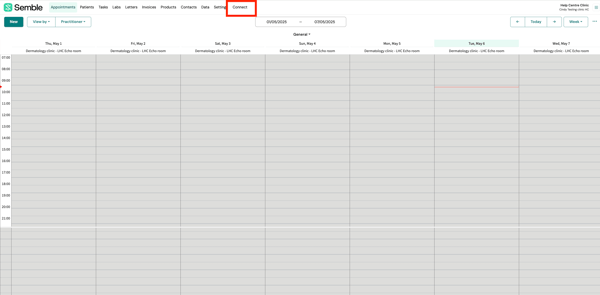
1. Go to the “Connect” tab.
2. Click on "Connect" on the automations page.
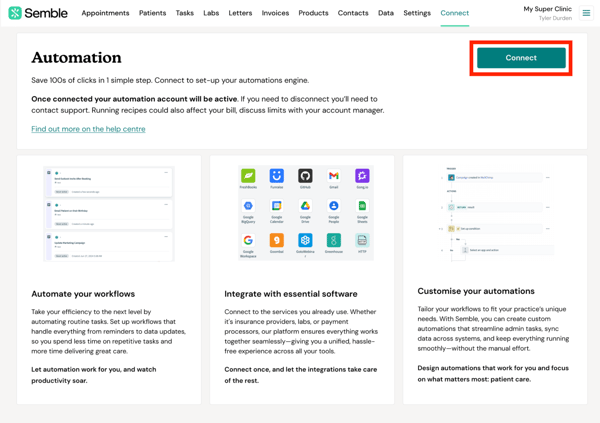
Once the practice is connected, other users will be able to access Semble Connect.
Note: Users without the manager role will be able to view automations, but cannot create or edit them.
Connect Your Apps
Semble Connect integrates with a wide range of applications, including popular tools such as Hubspot, Salesforce, Mailchimp and Slack, etc.. Here’s how to connect your apps:
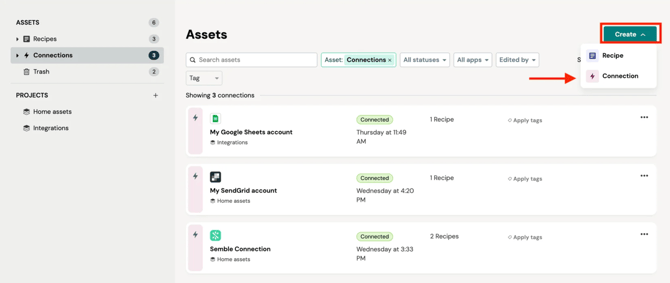
1. Go to the "Connections" tab in Semble Connect's landing page.
2. Click on "Create" and select "Connection".
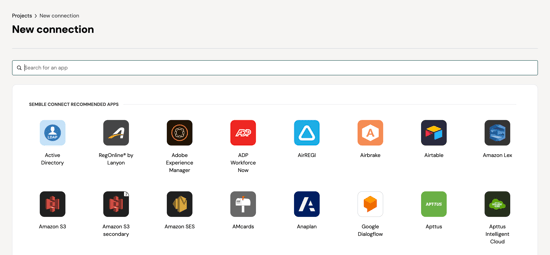
3. Choose the app you would like to integrate.
4. Follow the prompts to authenticate your app and grant necessary permissions.
Once connected, you can use Semble Connect to import data from these applications into Semble, or to send data from Semble to these applications as part of a Recipe.
Create a Recipe
In Semble Connect, workflows are called "recipes". These recipes automate tasks by linking triggers, actions, and conditions. Here’s how to create one:
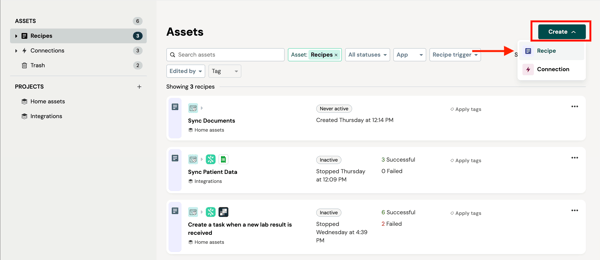
1. Go to the "Recipes" tab in your Semble Connect dashboard.
2. Click on "Create" and select "Recipe".
3. Add the name of your recipe and the location.
You can select one of your created location from the dropdown or you can create a new one by clicking on "New project".
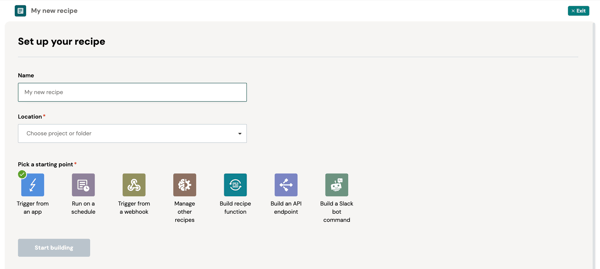
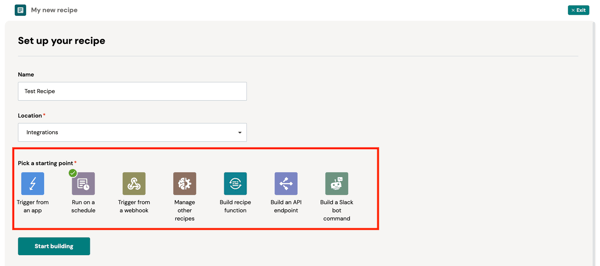
4. Select a trigger for your recipe.
The trigger could be a specific event in an app (e.g., a new lead in Salesforce) or a time based trigger (e.g run this workflow every x minutes)
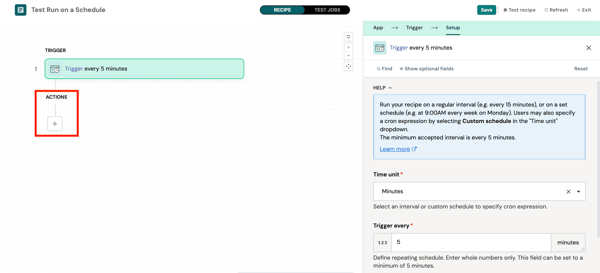
5. Click on "+" under "Actions" and choose an action that will take place when the trigger occurs (e.g., checking for new bookings).
6. (Optional) Start adding conditions by turning the toggle on.
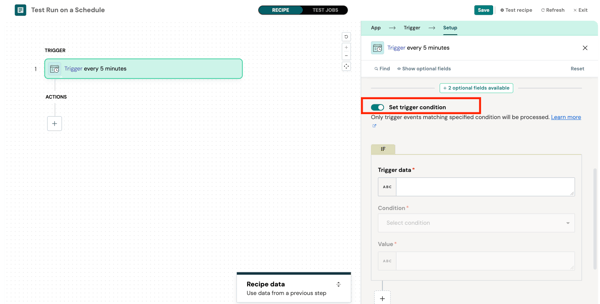
7. (Optional) Add filters if they are available as part of your apps trigger.
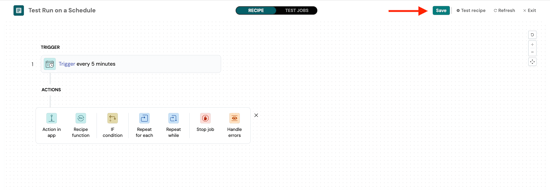
6. Click "Save"
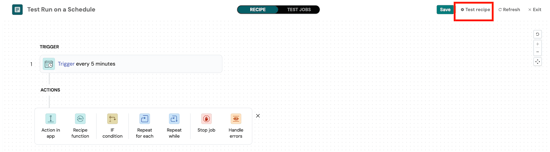
7. Test your recipe.
Once you are happy with the recipe and have tested it end to end. You can set it to start.
Starting and Stopping a Recipe
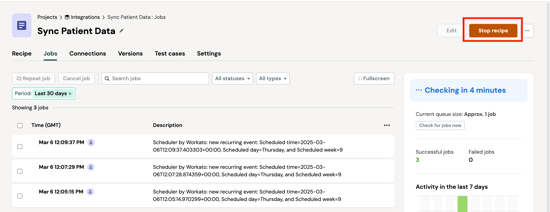
Before a recipe can automate a workflow, you need to set it to start. Once started, the recipe will run in the background and wait for the trigger that you defined when setting it up. When the trigger is activated, the steps in the recipe will run.
1. Go to the relevant "Recipe" in your Semble Connect dashboard.
2. Click on the green “Start Recipe” button
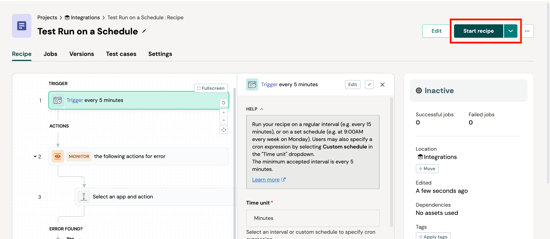
3. If needed, you can stop the recipe by clicking on "Stop Recipe"
Monitor Your Recipes
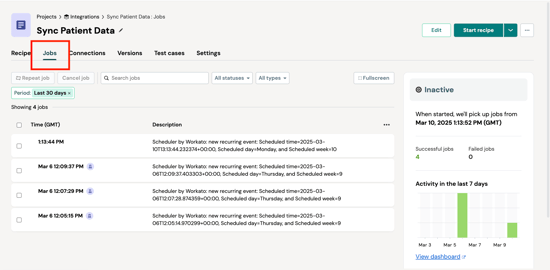
When a recipe is running, it can be useful to monitor the automation tasks that have been performed.
To do this, click on the relevant recipe and go to the "Jobs" tab to view its recent runs, success rates, and any errors.
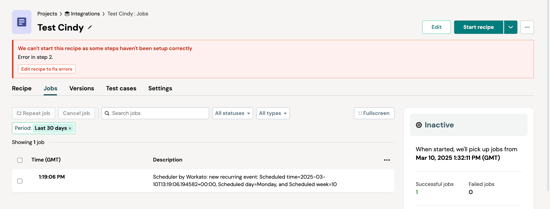
If a recipe encounters an error, you will see what went wrong and how to fix it.
Version Control
Any user in a practice with the manager role can access Semble Connect and can view and edit recipes.
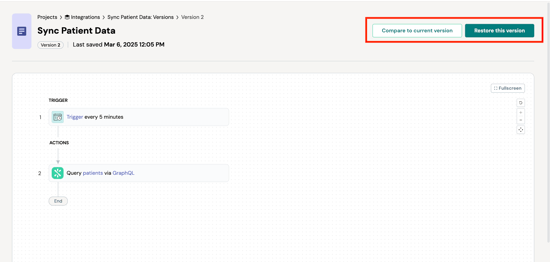
When making changes to a recipe, every time you save the recipe a version is created. It is possible to revert back to previous versions if more recent changes need to be rolled back. Versions are saved indefinitely.
1. Go to the “Versions” tab of the relevant recipe.
2. Click on a version of the recipe: You can see all the steps in the recipe.
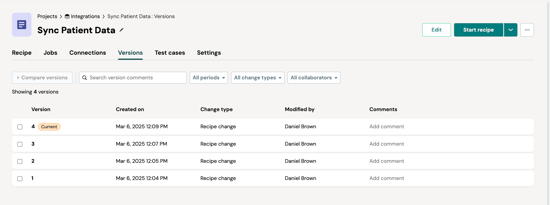
3. Click “Restore this version” to revert the recipe to a previous state or "Compare to current version" to compare the chosen recipe to the one you currently use.
Pre-built Connector Directory
Semble Connect offers access to over 1,200 connectors across two tiers: Standard and Enterprise. The tier determines which plan you need to use specific connectors.
Tip: If you're looking for a specific app or tool in our extensive list, here is a quick tip to help you find it easily:
Use the Find Function on Your Keyboard:
-
-
On Windows/Linux, press Ctrl + F
-
On Mac, press Cmd + F
This opens a small search box in your browser where you can type the name of the app/tool.
-
Most Common Standard Tier Connectors
| Category | Connectors |
|---|---|
| Productivity | Google Workspace (Calendar, Sheets, Gmail), Microsoft Teams, Outlook, OneDrive, SharePoint |
| Communication | Slack, Zoom, Twilio |
| CRM & Sales | Salesforce Professional, HubSpot, Pipedrive |
| Project Management | Asana, Jira, Monday.com, Trello, Miro |
| Accounting & Payments | QuickBooks Online, Xero, FreshBooks, PayPal, Stripe, Square |
| E-commerce | Shopify |
| Documents | DocuSign, Dropbox |
| Customer Support | Zendesk, Intercom |
| Marketing | Mailchimp, Klaviyo, SendGrid |
| Other Tools | Calendly, Typeform, Pendo, Productboard |
Most Common Enterprise Tier Connectors
| Category | Connectors |
|---|---|
| Enterprise ERP | SAP S/4HANA, Oracle E-Business Suite, Oracle NetSuite, JD Edwards |
| Enterprise HR | Workday HCM, SAP SuccessFactors, UKG Pro, UKG Dimensions, ADP Workforce Now |
| Healthcare Systems | Epic, Veeva CRM, Cerner, Allscripts, Athenahealth |
| Advanced CRM | Salesforce Enterprise/Unlimited, Salesforce CPQ, Salesforce Marketing Cloud |
| Enterprise Finance | Oracle Fusion Cloud, Microsoft Dynamics 365 F&O, Sage Intacct |
| IT & Operations | ServiceNow, Snowflake, MongoDB Atlas Enterprise |
| Enterprise Marketing | Marketo, Braze, Eloqua (Oracle), Adobe Experience Cloud |
| Data Platforms | Databricks, Tableau Enterprise |
More Standard Tier Connectors by Category
| Category | Applications |
|---|---|
| Accounting & Finance | Bill.com, Brex, Chargebee, FreshBooks, Maxio, QuickBooks Online, Ramp, Recurly, Sage, Wave, Xero |
| Communications | Aircall, Chatter, Discord, Google Meet, RingCentral (Standard), Slack, Twilio (Standard), Whereby, Zoom |
| CRM & Sales | Apollo.io, Copper, Freshsales, HubSpot, Insightly, Pipedrive, Salesforce (Professional), SalesLoft (Standard), Zoho CRM |
| Customer Support | Freshdesk, Freshservice, Front, Gladly, Gorgias, Groove, Help Scout, Intercom (Standard), Zendesk |
| Data & Analytics | Chartbeat, Google Analytics, Google BigQuery (Standard), Microsoft Power BI (Pro), Microsoft SQL Server, MongoDB Atlas, MySQL, PostgreSQL, Tableau (Creator/Explorer) |
| Development & IT | AWS API Gateway, AWS Lambda, Azure Blob Storage, Bitbucket, Datadog (Standard), Elasticsearch, GitHub, GitLab, Jenkins, Jira Service Desk, New Relic (Standard), OpsGenie, PagerDuty (Standard), Rollbar |
| Document Management | Adobe Sign, Box (Business), DocuSign, Dropbox, GetAccept, HelloSign, PandaDoc |
| E-commerce & Retail | AfterShip, Amazon Seller Central, BigCommerce (Standard), ChannelEngine, Clover, EasyPost, Lightspeed Commerce, Lightspeed Retail R-Series, Neto, Shipmonk, ShipStation, ShipWire, Shopify, Walmart Seller Centre, WooCommerce |
| Events & Video | Bizzabo, Cvent (Standard), Eventbrite, Hopin, Instagram, Loom, Swoogo, Vidyard, Vimeo, Wistia, YouTube |
| Forms & Surveys | Acuity Scheduling, FormAssembly, Formstack Documents, Google Forms, Gravity Forms, JotForm, Qualtrics (Standard), SurveyMonkey, Typeform, Wufoo, YouCanBookMe |
| HR & Talent | 15Five, Ashby, BambooHR, Bamboo, ChartHop, Culture Amp, Employment Hero, Fountain, Greenhouse (Standard), Gusto, HiBob, JazzHR, Lattice, Leapsome, Lever (Standard), Personio, Workable, Zenefits |
| Integration & Automation | FTP/FTPS, Scheduler by Workato, Semble Connector, SFTP, Variables by Workato, Webhooks by Workato |
| Marketing & Email | ActiveCampaign, Amplitude (Basic), Appcues, Campaign Monitor, Constant Contact, Drift, Facebook Lead Ads, Facebook Marketing, Google Ads, Heap, Klaviyo, Leanplum, LinkedIn, Localytics, Mailchimp, Microsoft Advertising, Mixpanel, SEMrush, Segment, SendGrid, Unbounce, X (Twitter) |
| Payments | Adyen, Authorize.Net, Braintree, PayPal, Square, Stripe |
| Productivity | Calendly, Excel, Fathom, Google Calendar, Google Docs, Google Drive, Google Mail, Google Sheets, Google Slides, Healthcode, Microsoft Teams, OneDrive, Outlook, SharePoint (Standard) |
| Project Management |
Airtable, Asana, Basecamp 2, ClickUp, Confluence, Jira, Linear, Miro, Monday.com, Notion, Pendo, Pivotal Tracker, Productboard, Teamwork, Todoist, Trello, Userflow |
More Enterprise Tier Connectors by Category
| Category | Applications |
|---|---|
| AI & Machine Learning | Amazon Lex, Amazon SageMaker, AWS Bedrock (Enterprise), Azure OpenAI, Databricks ML, Google Gemini, Google Natural Language, Google Speech to Text, Google Text to Speech, Google Vertex AI, Google Vision, Mistral AI, Ollama, OpenAI, Watson Tone Analyser |
| Business Applications | Microsoft Dynamics 365 |
| Communications | Avaya, Cisco Webex Contact Centre, Cisco Webex Teams (Enterprise), RingCentral (Enterprise), Twilio (Enterprise) |
| CRM & Sales | Crelate, Oracle CX Cloud, Oracle Sales Cloud, Outreach (Enterprise), Salesforce CPQ, Salesforce (Enterprise/Unlimited), Salesforce Marketing Cloud, Salesforce Pardot, SalesforceIQ, Sugar CRM (Enterprise), Vlocity |
| Customer Service | Five9, Genesys Cloud, Kustomer (Enterprise), Microsoft Dynamics 365 Customer Service, NICE inContact, Oracle Service Cloud, Zendesk (Enterprise), Zendesk Sunshine |
| Data Platforms | Amazon Redshift, Azure Synapse Analytics, Cloudera, Databricks, Domo (Enterprise), IBM Cognos, Looker (Enterprise), Microsoft Power BI (Premium), MicroStrategy, MongoDB Atlas (Enterprise), Oracle Autonomous Database, Qlik Sense, Snowflake, Tableau (Enterprise), Teradata, ThoughtSpot |
| Document Management | Box (Enterprise), Citrix ShareFile (Enterprise), Egnyte (Enterprise), SharePoint (Enterprise) |
| E-commerce | BigCommerce (Enterprise), Magento 2 (Enterprise) |
| Enterprise ERP | Acumatica ERP, Blue Yonder, Epicor ERP, IFS Applications, Infor CloudSuite, JD Edwards, Manhattan Associates, NetSuite OpenAir, Oracle E-Business Suite, Oracle Fusion Cloud, Oracle Industry Solutions, Priority Software, SAP Ariba, SAP Business One, SAP Concur, SAP ECC, SAP Industry Solutions, SAP S/4HANA |
| Financial Management | Adaptive Insights (Workday), Anaplan, Coupa, FinancialForce, Jaggaer, Microsoft Dynamics 365 F&O, OneStream, Oracle Planning and Budgeting Cloud, Oracle Procurement Cloud, Sage Intacct, Tipalti Approve, Workday Financials, Xactly, Zuora for Salesforce |
| Healthcare & Life Sciences | Allscripts, Athenahealth, Cerner, eClinicalWorks, Epic, IQVIA, Medidata, Veeva CRM, Veeva Vault |
| HR & Payroll | ADP Workforce Now, Ashby (Enterprise), Ceridian Dayforce, iCIMS, JobAdder, Jobvite (Enterprise), Namely (Enterprise), Oracle HCM Cloud, Sapling HR (Enterprise), SAP SuccessFactors, SmartRecruiters (Enterprise), TriNet, UKG Dimensions, UKG Pro, Workday HCM, Workday (Custom/REST/Web Services) |
| Integration & Automation | Workato (Enterprise tier), Workato HTTP |
| IT Operations & DevOps | AppDynamics, BMC Remedy, Cherwell, Datadog (Enterprise), Dynatrace, Elastic Enterprise, Ivanti, ManageEngine ServiceDesk Plus, New Relic (Enterprise), ServiceNow, ServiceNow Security Operations, Splunk Enterprise, Sumo Logic |
| Marketing | Adobe Campaign, Adobe Experience Cloud, Braze, Eloqua (Oracle), Epsilon, Iterable (Growth/Enterprise), Marketo, Optimizely, Uberflip |
| Project Management | Aha! (Enterprise), Confluence (Enterprise), Jira (Enterprise), Microsoft Project, Smartsheet (Enterprise), Workfront, Wrike (Enterprise) |
| Revenue Intelligence | Chorus.ai, Clari, Gong.io, People.ai |
| Security | CyberArk, Okta (Enterprise), Ping Identity, Qualys, Tenable |
Troubleshooting Common Issues in Semble Connect
While using the Semble Connect you might run into a few common issues. Below you will find some of the common issues and solutions.
Recipe Not Triggering
If your recipe isn’t triggering as expected, there could be several reasons:
- Check your trigger conditions: Ensure that the conditions for the trigger are correctly set up.
- Verify app connections: Make sure the apps integrated with your recipe are properly connected and authenticated.
- Inspect the logs: Look at the activity log for any error messages related to the trigger.
- If the issue persists, try re-authenticating your app connection and re-saving your recipe.
Action Not Executing
If an action in your recipe isn’t being executed:
- Check app permissions: Make sure the app has the necessary permissions to perform the action.
- Examine the action setup: Verify that the action is configured properly (e.g., selecting the correct fields or parameters).
- Review error logs: Check for any errors in the activity log related to the action.
- If everything looks good but the issue persists, try creating a new recipe with a similar action to isolate the issue.
Slow Performance
If the Semble Connect is running slowly, consider these tips:
- Optimise recipes: Simplify your recipes to remove unnecessary steps and actions.
- Check your internet connection: Ensure that your connection is stable and fast.
- Monitor recipe performance: Use the activity log to check how long individual steps take to complete.
Connection Errors
Sometimes, you might encounter issues when connecting an app to Semble Connect:
- Re-authenticate: Log out and log back in to the connector to refresh the connection.
- Check app status: Verify that the app you’re connecting to is online and functional.
- Try a different browser: Sometimes, browser-related issues can cause connectivity problems. Try switching to a different browser.
If none of these steps help, you can contact support@semble.io team for further assistance.